
Spacetalk Schools
Support
Ensuring you have the
resources you need
Are you a new parent to our app?
Getting started with the Spacetalk Schools app is simple!
- User Guides
- 'How to' Cheat Sheets
- Troubleshooting
ROLLMARKER
| Mark a student absent for today |
| Mark a student absent for a date range |
| Create recurring absence |
| Import Rollmarker absences into SIS |
| Create announcement |
| View student attendance log |
| View class attendance log |
| View a student's timetable |
| View a student's attendance |
| Record dress code violation |
| View all dress code violations |
ROLLMARKER
Why is my internet slow with Rollmarker?
If you are noticing frequent disconnections or slow internet speeds during Rollmarker sessions, follow the below resolutions steps:
Ensure your computer or device is connected to a stable internet connection.
Restart your router and reconnect to the Rollmarker system.
Close bandwidth-intensive applications running in the background.
OUTREACH
How do I login to my account?
To access OutReach, users must Login via the main Login screen of OutReach. To do this:
Open a browser window (Internet Explorer 9+, Firefox 30+, Chrome 35+, Safari 5+)
Enter the Username (email), Password and School ID provided by your School Administrator
Click Login
If you have forgotten your login details, you can click on Forgot Password and follow the instructions.
How do I reset my password?
To reset your password, follow the below steps:
Your Email Address must be the Email Address that your School Administrator has used to set up your User account. If your Email address has changed since your account was first created, please contact your School Administrator to have it updated.
Your School ID is the same as the School ID that you would normally use to login. This ID is the same for all the users at your school.
Once you have entered your Email Address and School ID, click on Send Password and a Reset Password email will be sent to your Email Address.
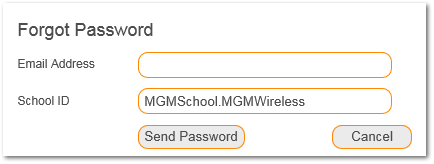
If the Email Address that you have entered is incorrect, you will see the message below.
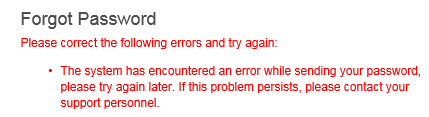
If you have entered the correct Email Address and School ID, you should see the message below.

Why is my internet slow with Outreach?
If you are noticing frequent disconnections or slow internet speeds during Outreach sessions, follow the below resolutions steps:
Ensure your computer or device is connected to a stable internet connection.
Restart your router and reconnect to the Outreach system.
Close bandwidth-intensive applications running in the background.
SPACETALK SCHOOLS APP
Why can't I open the Spacetalk Schools app on my phone?
If you are unable to open the Spacetalk Schools app on your mobile device, please follow the below steps:
- Ensure your mobile device is connected to Wi-Fi or Mobile Data.
- Delete the current app on your mobile device.
- Navigate through the Apple app store or Google Play Store and download the latest version of the Spacetalk school app.
I can't login to my Spacetalk Schools app account.
If you are unable to login to the Spacetalk Schools app, please follow the below steps:
- Ensure your mobile device is connected to Wi-Fi or Mobile Data.
- Contact your school administator and ensure your phone number is in the Outreach system.
Contact us
EMAIL SUPPORT
For extra support, please contact us at schoolsupport@spacetalk.co
Please note: this email is suitable for enquiries related to Spacetalk Schools sytems only. For Spacetalk watch and app enquiries, please visit our alternative support pages.
PHONE SUPPORT
For extra support, please contact us on (AU) 1800 300 346
Please note: this phone number is suitable for enquiries related to Spacetalk Schools sytems only. For Spacetalk watch and app enquiries, please visit our alternative support pages.